
Shrinking Your Cyber Attack Surface: A Practical Guide for SMBs
When you hear the term “attack surface,” it might sound like something only big corporations need to worry about. But the reality is, every small and mid-sized business has one—and it’s probably bigger than you think. Every new device, app, cloud service, or SaaS application your small business uses could unintentionally open a backdoor for cybercriminals.
But what exactly is your attack surface, and how do you protect it?
What Exactly is an Attack Surface?
Simply put, your attack surface is the total number of ways an attacker can potentially gain access to your systems or data. It’s not limited to your office computers. It includes:
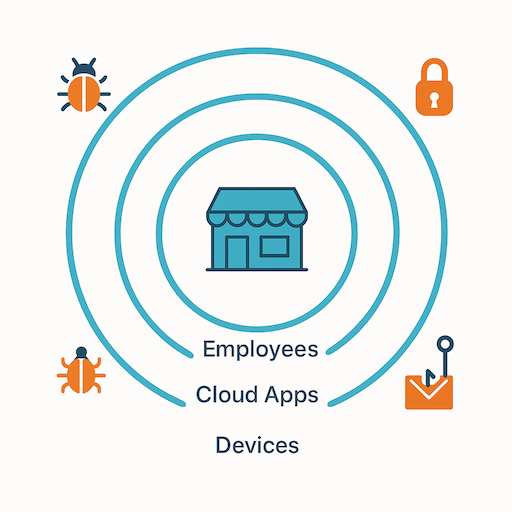
The bigger your business gets, the more exposure points appear—track them before attackers do.
- Digital Assets: Your websites, web applications, cloud servers, databases, publicly accessible APIs, employee laptops, mobile devices, and even forgotten subdomains.
- Human Assets: Your employees, their access privileges, their cybersecurity awareness, and their susceptibility to phishing or social engineering.
- Physical Assets: Your office network, physical servers, and any on-premise hardware that connects to your digital infrastructure.
This can feel like trying to hit a moving target. You’re innovating, growing, and adopting new technologies, which is fantastic for business. But as your business grows, so does your attack surface, making it crucial to proactively identify and manage these points of exposure.
Step 1: Inventory and Map Your Assets
You can’t protect what you don’t know exists. The first practical step to shrinking your attack surface is to get a comprehensive inventory of all your digital, human, and physical assets.
Start by listing everything. This might sound tedious, but it’s foundational. For your digital assets, consider:
- Domains and Subdomains: All the web addresses associated with your business.
- IP Addresses: Any public-facing IP addresses your servers or services use.
- Cloud Services: Every SaaS application, cloud storage, and infrastructure-as-a-service (IaaS) platform your team uses (think Google Workspace, Microsoft 365, Salesforce, AWS, Azure, etc.).
- Hardware: Laptops, desktops, servers, network devices, and mobile phones used by employees.
- Software: Operating systems, applications, and custom code running on your systems.
Manual tracking can quickly become outdated. This is where asset discovery tools come in handy. Leverage automated discovery tools that scan your network, websites, and cloud environments. These tools not only make asset tracking easier but also highlight resources you may have forgotten about or never knew existed.
Step 2: Map and Evaluate Your Assets
Alright, so you’ve taken stock of your digital landscape. That’s a huge win! But here’s a truth: not every asset carries the same weight when it comes to cybersecurity risk. With limited time and resources, you can’t treat every subdomain or internal tool with the same level of urgency.
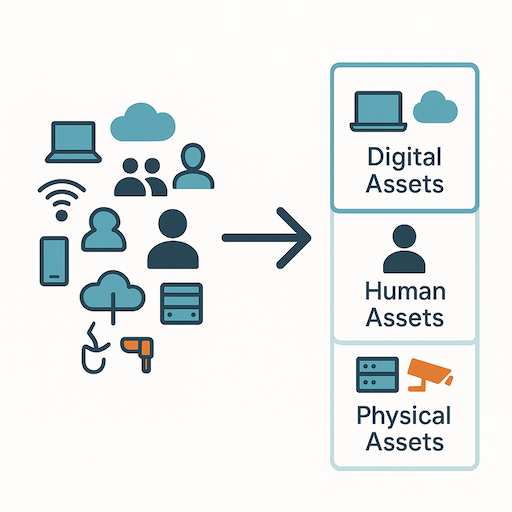
Start by making sense of the chaos—map and categorize your assets.
Think of it like this: if you have a leaky roof, you’d fix the biggest holes first, right? Cybersecurity works similarly. You need to understand which assets are your crown jewels and which ones are more exposed to potential threats.
Start by asking yourself a few key questions for each asset:
- What data does it hold? Does this server, application, or cloud service store sensitive customer information, financial records, or proprietary business data? Assets handling critical data deserve top-tier protection.
- How critical is it to your operations? If this asset went offline, would your business grind to a halt?
- How exposed is it to the internet? Public-facing assets—like your main website or a remote access portal—are inherently more vulnerable.
By mapping out these connections and evaluating each asset based on its importance and exposure, you can focus your security efforts where they’ll have the biggest impact.
Step 3: Remove or Isolate Unused and Vulnerable Assets
Once you have a clear picture of your assets, the next crucial step is to remove or isolate anything that’s no longer needed. Every unused account, every open port, and every deprecated device is a potential vulnerability waiting to be exploited.
- Stale Accounts: Review user accounts regularly. If an employee has left or a vendor no longer requires access, disable or delete their accounts immediately. Implement a “least-privilege” access model.
- Unused Ports and Services: Regularly check for open network ports that aren’t actively in use. Close them.
- Deprecated Devices: Old servers, network equipment, or employee devices that are no longer supported by security updates should be securely decommissioned.
This “digital decluttering” reduces potential entry points and might even save you money.
Step 4: Continuously Scan and Monitor
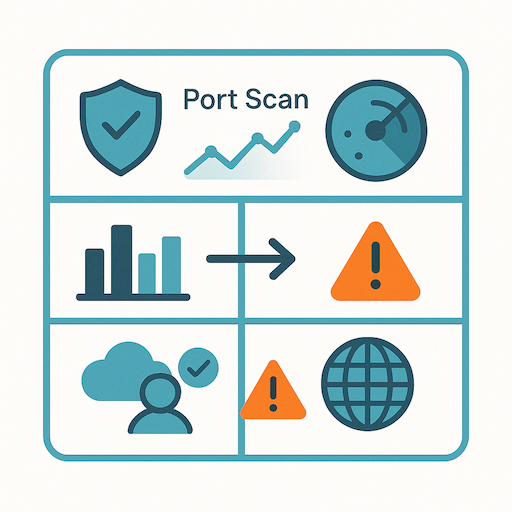
Your digital landscape changes fast—continuous monitoring keeps you ahead.
Your attack surface isn’t static; it evolves as your business evolves. New software updates, employees, and cloud services can introduce new exposures. That’s why continuous scanning and monitoring are essential.
- External Port Scans: Regularly scan your public-facing IP addresses for any newly opened ports or services.
- Web Service Checks: Monitor your websites and web apps for vulnerabilities or misconfigurations.
- Configuration Drift: Watch for unexpected changes in your cloud environments.
Integrating these checks into your routine helps maintain a dynamic and secure IT environment.
Step 5: Strengthen Your Cyber Hygiene
Even with a clean and monitored attack surface, vulnerabilities can still exist. Two of the most impactful ways to close these gaps are:
- Apply Patches Promptly: Ensure your systems and applications are always up to date. Many breaches happen because attackers exploit known vulnerabilities with available patches.
- Implement Multi-Factor Authentication (MFA): Weak or reused passwords without MFA are a common attack vector. MFA adds an extra layer of protection. If possible, consider Passkeys as a simpler and more secure alternative to passwords.
By proactively managing your attack surface, you’re not just reacting to threats—you’re building a stronger, more resilient defense for your business. It’s about being smart, strategic, and staying one step ahead in the ever-changing cybersecurity landscape.