
Don't Get Hooked: Protecting Your Business from BEC and AI-Powered Phishing
In today’s digital landscape, cyber threats are constantly evolving, and among the most insidious are Business Email Compromise (BEC) and phishing attacks. These social engineering tactics can be devastating, costing businesses billions annually. For small to mid-sized technology-driven businesses, especially those with lean IT teams, understanding and preventing these attacks is crucial.
The Growing Threat of Social Engineering
Attackers are becoming increasingly sophisticated, often impersonating executives, vendors, or trusted partners to trick employees into wiring money, divulging sensitive data, or clicking malicious links. The FBI reported a staggering $2.9 billion lost to BEC, highlighting the financial impact of these scams. Furthermore, data indicates that employees in Small to Medium-sized Businesses (SMBs) face 350% more social engineering attempts than their counterparts in larger firms, making this an even more pressing concern.
Emerging Tactics: Deepfakes and AI-Generated Emails
The rise of artificial intelligence (AI) has introduced new dimensions to social engineering. We’re now seeing emerging tactics like deepfake voice phishing, where AI is used to mimic a known voice to authorize fraudulent transactions. Similarly, AI-generated emails are becoming incredibly convincing, often indistinguishable from legitimate communications due to perfect grammar and contextually relevant content. This makes it harder than ever for employees to spot a fake.
5 Key Strategies to Recognize and Prevent Attacks
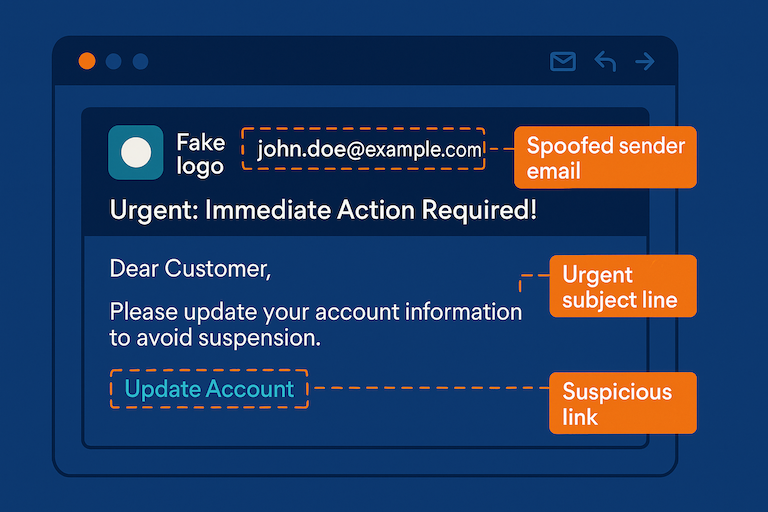
Can you spot the warning signs? Learn to dissect a phishing email.
Educate Your Team
Your employees are your first line of defense. Conduct regular training sessions to educate them on how to identify phishing emails. Key indicators include:- Spoofed Domains: Look for subtle misspellings or variations in email addresses and sender domains.
- Urgent or Threatening Language: Phishing emails often create a sense of urgency or fear to prompt immediate action.
- Unusual Requests: Be wary of unexpected requests for sensitive information, financial transfers, or changes to payment details.
- Generic Greetings: Legitimate communications usually address you by name, not a generic “Dear Customer.”
- Suspicious Links or Attachments: Always hover over links to see the true destination before clicking, and be cautious about opening unsolicited attachments.
Implement Email Authentication (SPF, DKIM, DMARC)
These protocols make it much harder for attackers to spoof your domain:- Sender Policy Framework (SPF): Specifies which mail servers are authorized to send email on behalf of your domain.
- DomainKeys Identified Mail (DKIM): Adds a digital signature to your emails, verifying their authenticity.
- Domain-based Message Authentication, Reporting, and Conformance (DMARC): Builds upon SPF and DKIM, providing instructions to receiving email servers on how to handle emails that fail authentication checks. Implementing DMARC can significantly reduce the success rate of email spoofing.
Enforce Multi-Factor Authentication (MFA)
For all email and office accounts, MFA adds an essential layer of security. Even if an attacker compromises a password, they’ll be blocked without the second verification factor (e.g., a code from a mobile app or a biometric scan).Establish Multi-Person Verification for Financial Transactions
Never allow a single individual to approve wire transfers or significant financial transactions. Implement a policy requiring at least two or more authorized personnel to verify and approve all such requests, ideally through out-of-band communication (e.g., a phone call to a known number, not replying to the email). Consider setting up internal “code words” for authorizing sensitive transactions, which must be shared verbally during verification calls.Regularly Test Employees with Simulated Phishing Exercises
The best way to gauge your team’s readiness is to test them. Conduct simulated phishing campaigns to see who clicks on suspicious links or falls for common tricks. Use these exercises as learning opportunities, providing immediate feedback and additional training.
Bonus: Consider AI Solutions for Advanced Phishing Detection As AI-powered phishing becomes more prevalent, leveraging AI-driven solutions for email security can provide an extra layer of defense. These tools can analyze email content, sender behavior, and other indicators to detect sophisticated phishing attempts that might bypass traditional filters.